
Quick Summary
- A low impressions click-through rate does not prove the title is the problem. Check impressions, traffic source, audience reach, thumbnail and watch behavior together.
- Compare a video with your own similar videos at a similar stage, not with a universal CTR target.
- If the video has meaningful impressions and the package is unclear or mismatched, revise one element at a time and record the date.
- Keep the title promise aligned with the thumbnail, opening and actual payoff.
- Use YouTube Studio's native title and thumbnail test when it is available, then judge its watch-time result rather than a tiny CTR movement.
A 3% CTR on Browse and a 3% CTR on Search do not describe the same viewer situation. Before editing your title, find which surface supplied the impressions and whether the thumbnail set the right expectation.
What a low YouTube CTR can and cannot tell you
Impressions click-through rate is the share of counted thumbnail impressions that led to a view. It is a packaging signal, not a score for the title alone: the thumbnail, topic, viewer, and surface all influence whether someone clicks. A search impression and a Home impression do not represent the same intent.
YouTube notes that CTR can fall as impressions expand to broader audiences, even while the video earns more views. It also says half of channels and videos fall within a broad 2% to 10% range, which is not a target for every video. Compare like with like inside your channel and examine traffic sources before deciding that the title is weak. The title and thumbnail strategy guide explains how to make the pair communicate one promise.
How to diagnose a title that is not getting clicks
Start in YouTube Studio Analytics for the individual video. Set a useful date range and inspect impressions, impressions CTR, views, average view duration and traffic source together. Separate Browse, Suggested and Search where the report allows it. Ask whether the CTR is low compared with similar videos on the same surface, and whether impressions are still expanding.
Then inspect the promise. Can a new viewer tell what the video is about and why it may help or interest them? Does the title accurately describe the footage? Does the thumbnail add a useful visual clue, or repeat the same words without adding meaning? A vague subject, unsupported superlative or missing outcome can make the package harder to choose. For examples of how the division works, read how to divide one video promise between title and thumbnail.
Finally, look at what happens after the click. If the title attracts viewers who leave quickly because the video does not deliver, making the wording more sensational is likely to deepen the mismatch. Review the opening and the actual payoff before rewriting the package.
A practical decision table
| What you see | What to check next | Sensible next move |
|---|---|---|
| Low CTR on a small number of impressions | Whether the sample is still too early or narrow | Wait for more meaningful evidence; avoid a snap judgment |
| CTR falls while impressions and views grow | Whether the video is reaching a wider audience or new surfaces | Compare traffic-source slices and total watch time |
| Similar videos consistently outperform this one on the same surface | Topic, thumbnail clarity and title promise | Write a few accurate variants and test one change |
| CTR is strong but early viewing is weak | Whether the title or thumbnail overpromises | Improve the match between package, opening and content |
| Search is stronger than Browse | Whether the title names the searched problem clearly | Preserve the recognizable topic while sharpening the payoff |
These patterns are diagnostic prompts, not causal proof. Video topic and audience differ, so a comparison cannot isolate a title effect by itself.
A five-minute low-CTR check in YouTube Studio
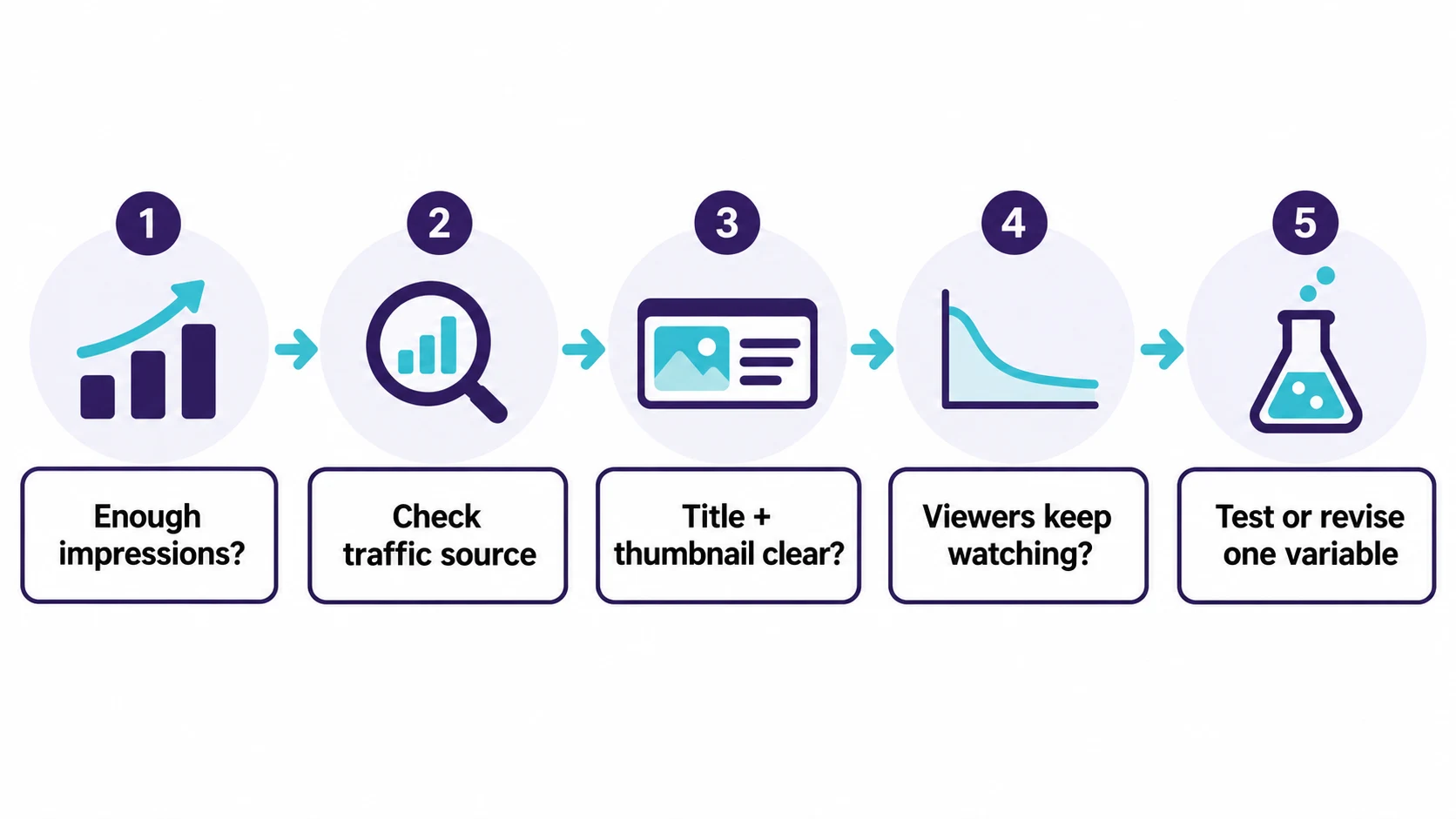
Start with one question: is this video receiving enough of the right impressions for a comparison to be useful? Open the video's Analytics area and look at Reach before changing any wording. Note the date range, impressions, CTR, views and the main traffic sources. A video that has only reached subscribers or channel-page visitors is not directly comparable with one that is appearing on Home or beside competitor videos.
Next, review the package as a first-time viewer. Hide the channel name and ask someone to answer three things from the title and thumbnail: what is this video about, who is it for, and what will they get after watching? If they cannot answer quickly, clarity is a stronger improvement target than adding urgency or a bigger claim.
Then open the retention view. If viewers click but leave before the promised answer, changing only the title can make the mismatch worse. Improve the opening or choose a title that represents the actual value. This makes the next decision about the video, not merely about one percentage.
Separate title problems from thumbnail, topic and audience problems
A title is rarely the only reason a viewer clicks or skips. Use this short checklist before rewriting it.
| Possible cause | Useful evidence | What to change first |
|---|---|---|
| The subject is unclear | A new viewer cannot name the topic from the package | Put the recognizable subject earlier in the title |
| The thumbnail and title repeat each other | Both say the same vague phrase | Let one state the topic and the other add proof, outcome or visual context |
| The promise is too broad | Clicks are followed by a weak opening or early exits | Narrow the promise to what the video actually delivers |
| The topic has limited audience fit | Similar packaging performs normally but impressions stay narrow | Revisit the topic, search need and audience match |
| Traffic sources changed | CTR shifts as Home, Search or Suggested share changes | Compare the same source over time rather than one blended total |
For example, imagine a Tamil phone tutorial titled "Phone Slow Ah? Do This." The title points to a problem but not the device, action or expected result. A clearer version such as "Samsung Phone Slow? Clear Storage Without Deleting Photos" gives a compatible thumbnail something useful to show, such as a storage screen and before/after space. This is an illustrative rewrite, not a performance claim.
How should you improve a low-CTR YouTube title?
Write three alternatives that express the same video truth in different ways: a clear searchable version, a specific outcome version and a curiosity-led version with a concrete reason to click. Use the YouTube title formulas guide to vary structure, then check each version against the finished video.
If your channel has access to YouTube's built-in A/B testing, test title only or thumbnail only when you want to learn about that element. The native tool can test up to three options for eligible long-form videos and determines its winner using watch time. If you change a title or thumbnail during a running experiment, the test stops. Shorts are not currently eligible for this test according to YouTube Help. The YouTube title-testing walkthrough explains how to choose the test type. When native testing is unavailable, a before-and-after edit is observational, not a controlled experiment: traffic, time and viewers also change.
A safer title-revision workflow
- Write down the current title, thumbnail, date, traffic-source mix and the issue you are trying to solve.
- Create two or three truthful alternatives that keep the same subject and payoff. Do not test a language change, new claim and new thumbnail at once.
- Check each option against the video's first 30 seconds. The opening should confirm the promise quickly.
- Use YouTube's title-only experiment when the video is eligible. Otherwise make one documented edit and compare a suitable period, while treating the result as directional.
- Save the lesson in a simple channel note. Over several videos, this can reveal patterns in your own audience without pretending one edit proves a universal rule.
The aim is not to chase a particular CTR number. It is to help the right viewer understand the video before clicking, then receive what the package promised.
What does CTR stand for on YouTube?
CTR means click-through rate. [Impressions CTR](/blog/youtube-click-through-rate-meaning/) measures how often viewers watched after seeing a registered thumbnail impression on YouTube. It does not include every view source.
What is a good YouTube impressions CTR?
There is no single target that fits every video. YouTube reports a broad 2% to 10% range for half of channels and videos, while emphasizing that traffic source, audience and reach affect the metric. Compare similar videos and surfaces over time.
Should I change the title if CTR is low?
Only after checking whether the video has enough relevant impressions and whether the title is the likely issue. Review the thumbnail, audience, traffic source and post-click behavior first. If you change the title, keep a record and avoid claiming that a simple before-and-after proves causation.
Why did my CTR fall when views increased?
A video may reach a broader, less familiar audience as impressions grow. That can lower CTR while total views rise. Check impressions, views and traffic-source breakdowns together before treating the change as a title problem.
Can a thumbnail cause low CTR even if the title is good?
Yes. Viewers see the title and thumbnail as one package. A thumbnail that is unclear, repeats the title without adding context, or suggests a different video can reduce clicks or attract the wrong clicks.
How long should I wait before judging YouTube CTR?
There is no fixed waiting period. Wait until the video has enough impressions to compare with similar videos and examine how its audience and traffic sources are changing. Early readings can move sharply.
Is high CTR always good for a YouTube video?
No. High CTR with weak average view duration can indicate that the packaging promises more than the video delivers. The useful goal is a clear package that brings in viewers who keep watching.
Your next step
Review one video with the diagnostic table, then write a truthful title variant that improves clarity. If you want to draft options from the video's audience, promise and proof, try the Scriptio is on a break until April 1, 2027, then verify every suggestion against the finished video.
Sources: YouTube Analytics CTR and impressions guidance, YouTube impressions CTR FAQs, YouTube title and thumbnail tips, YouTube A/B testing titles and thumbnails